
Hall of Fans — Beta Testing Guide
V0.7 • Last Updated: November 8, 2025
Welcome HOF Fan and Beta Tester!
Thanks for helping shape Hall of Fans. This platform is for passionate music fans—your feedback matters.
If you get stuck signing in or verifying, email support@halloffans.com.
Beta Program Objectives
Kick the tires on sign-up, navigation, and building your first Museum Wing. Explore, complete a few tasks, and tell us what’s smooth (and what’s not).
Your Step-by-Step Guide
Phase 1 — Onboarding
- Confirm Beta Participation — Use the form on the Beta Tester Home.
- Register — Create your account on the Register page.
- Verify your email — Click the activation link, then log in.
Get to your profile fast: Click the user menu at the top-right (small circle with a caret) → Profile.
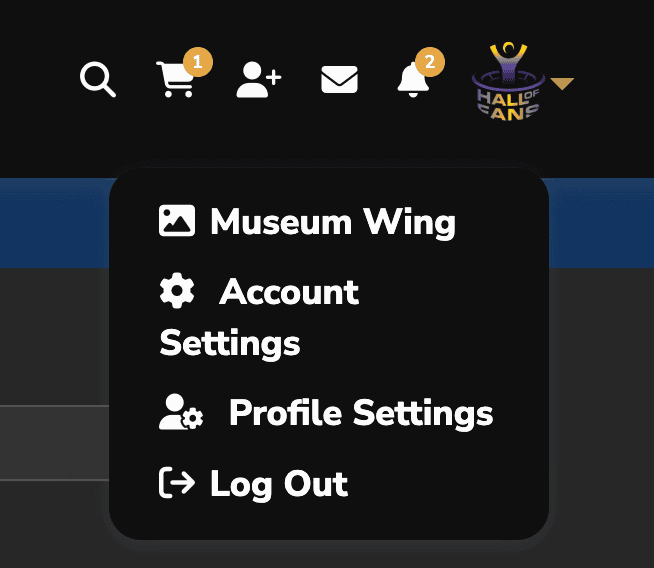
Phase 2 — Your First Mission: Build Your Museum Wing
Your Museum Wing organizes photos, videos, audio stories, and documents into searchable Collections.
-
Open your Museum Wing — On your profile, open the Museum Wing tab.

Find the Museum Wing tab on your profile. -
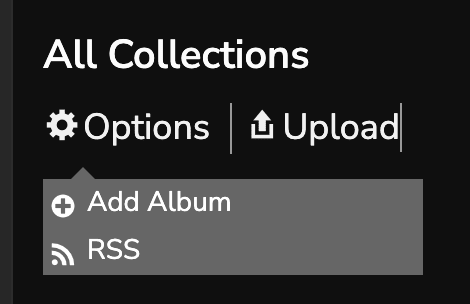
Create a Collection first (recommended) — Go to Collections → Options → Add Album. Name it (band, tour, year, show), then save.

Create a new Collection to tell a focused story. -
Upload directly into that Collection — Open the Collection → click Add/Select Media → upload your files (Photos / Videos / Audio).

Upload by media type as you add to the Collection. - Alternate (no Collection) — You can simply upload to Photos / Videos / Audio without creating a Collection.
- Fine-tune — Reorder items, set a cover, add captions.


Note on Collections: Every account starts with a General Collection that automatically shows all media you’ve uploaded. Create additional Collections when you want to organize a story (e.g., a tour, a single show, a theme).
Audio tip: Short voice notes are great. Share why a show mattered, talk about a recent highlight, reminisce about a favorite music moment, or the last band that surprised you. For how-to steps, see Understanding Your Museum Wing → Audio.
Inspiration: Examples to browse —
Greg’s Museum Wing •
Tom Constanten’s Museum Wing
These are works in progress, not “perfect” models.
These are works in progress, not “perfect” models.
Providing Feedback (The Most Important Part)
Please keep notes as you explore. Two primary channels:
- General Feedback & Ideas — overall impressions, UX suggestions, feature requests: Share Your Experience or email feedback@halloffans.com.
- Technical Issues & Bugs — broken flows, errors, access problems: Report an Issue or email support@halloffans.com.
What to Include in a Helpful Bug Report
- Where it happened — page/URL.
- What happened — 1–3 sentences.
- What you expected — 1–3 sentences.
- Device & browser — e.g., iPhone 15 / Safari, Windows / Chrome.
- Screenshot (optional, very helpful) — attach an image if you can.
- Follow-up okay? — Yes/No at the end of the form.
Quick Tester Checklist
- Create account and log in
- Set profile photo and cover photo
- Create a Collection
- Upload at least one photo and one short audio story
- Browse Fans and join at least one Fan Group
- Leave one comment or reaction
- Submit one piece of feedback or a bug (if any)
Thank You
Your time and perspective are invaluable. Thanks for helping us shape Hall of Fans.
— The Hall of Fans Team
